
Add tags and ignore Participants using CSV files
You can import additional information into results you have already collected. Right now, RealEye supports importing tags from CSV (comma-separated values) text.
#Where to find it
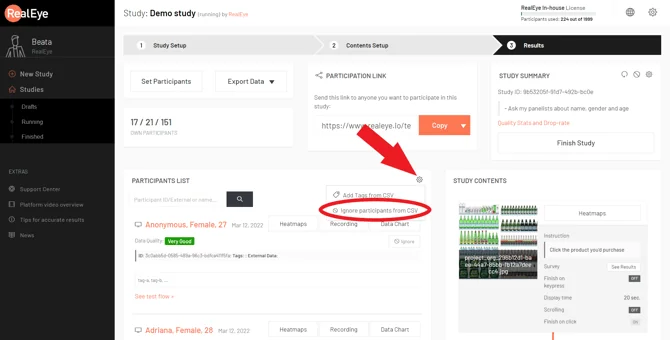
- Open your study and go to the Results step.
- In the Participants list panel, click the gear (settings) icon.
- Choose Add Tags from CSV to add tags, or Ignore participants from CSV to ignore participants.
#Add tags from CSV
The import field takes pasted text, not an uploaded file.
The required format is one participant per line:
participant-id,tag1;tag2;tag3
- Separate the participant ID from the tags with a comma.
- Separate multiple tags with semicolons.
- Do not add a header row.
Note: the participation link's realeye-tester-tags parameter separates tags with commas, while this CSV import separates them with semicolons.
Below is a sample with two participants:
c238e415-dd1b-4cd0-bc77-5bea0add5207,consumer;user;valid
246ddf9b-5d42-4dde-bd13-aa0d840e45d0,consumer;not-valid;under30
Important: Copy the final text from a plain text editor, such as Notepad, before pasting it into RealEye. If you copy directly from Excel or Google Sheets, the values are pasted with hidden tab characters instead of commas. RealEye then reads the whole row as the participant ID and shows an error.
#Ignore participants from CSV
Provide one participant ID per line, with no tags and no commas:
c238e415-dd1b-4cd0-bc77-5bea0add5207
246ddf9b-5d42-4dde-bd13-aa0d840e45d0
TIP: To ignore all participants with a certain quality grade, download the CSV file, filter the results by the grade, and copy the participant ID column.
#Troubleshooting
"Wrong CSV structure: Invalid UUID string"
This message appears when adding tags; the ignore flow instead reports how many participant IDs could not be ignored.
RealEye could not read a valid participant ID from a line. Common causes:
- The text was pasted from Excel or Google Sheets, so the columns use tab characters instead of commas. Paste the text into Notepad first, then copy it from there, and paste it into RealEye.
- A header row is present. Remove the header row and paste the data again.