
How to delete an AOI?
#This guide explains how to delete an AOI (Area of Interest) in RealEye.
AOI stands for Area of Interest - a key concept in eye-tracking research and analysis. It refers to specific, predefined regions within a visual stimulus (like a website, advertisement, product packaging, or image) that researchers or analysts want to track and analyze user visual attention on.
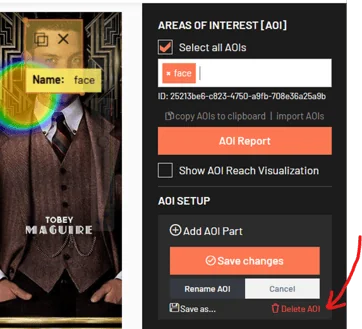
In the Analytics Dashboard, on the AOI panel on your right-hand side, you will see a list of all defined AOIs for the item. To delete an AOI:
-
From the list, select the AOI you want delete.
⚠️ Note: At this moment, it is only possible to delete AOIs one by one. -
Once selected, click the Delete AOI (bin icon) to permanently remove it.
-
Confirm deletion. The AOI will be removed from the list and from any metrics calculated for this study. Deleting an AOI cannot be undone.
💌 If you have any questions or need further assistance, feel free to reach out to our team at support@realeye.io